
Legday
[Springboot] 이미지를 로컬에 저장하고 DB에 저장 본문
프론트 단에서 이미지를 받아와 로컬에 저장후 데이터베이스에는 이미지 정보를 담아서 관리한다. 이미지 자체를 데이터베이스에 저장하는 방법도 있지만 잘 쓰지 않는 방법이다.
1. HTML구현( test.jsp)
- html enctype의 기본은 application/x-www-form-urlencoded 이다.
- multipart/form-data 는 파일이나 이미지를 전송할 때 쓰는 타입이다.
<!DOCTYPE html>
<html lang="ko">
<head>
<!-- bootstrap을 css cdn -->
<link rel="stylesheet" href="https://stackpath.bootstrapcdn.com/bootstrap/4.3.1/css/bootstrap.min.css"
                type="text/css" />
</head>
<body>
	<div class="layout">
    	<form action="upload" method="post" enctype="multipart/form-data">
    		<input name="file" type="file">
            <button type="submit">작성</button>
        </form>
	</div>
</body>
</html>
2. 테이블 생성
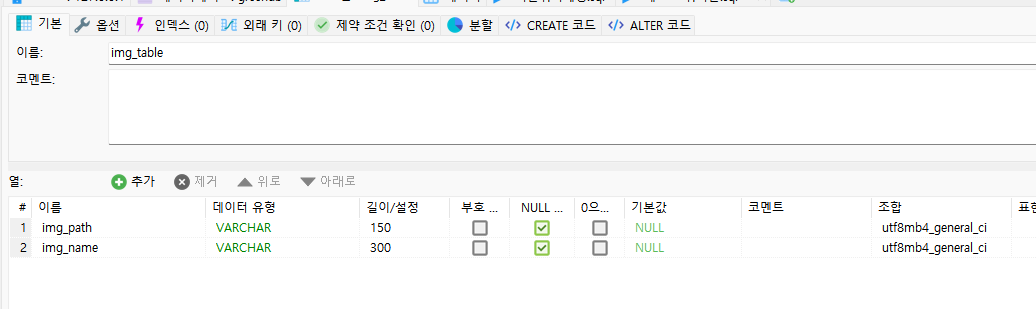
- 이미지를 저장할 테이블을 생성하고 이미지경로랑 이미지이름을 받아야 하니까 아래와 같이 생성한다.
3. Controller,Service ,Entity, Dao,MyBatis구현
- MyBatis는 Mapper 인터페이스를 통하여 sql을 실행하기 때문에 ImgTableDao 인터페이스와 매핑하고 insert라는 이름의 insert문을 적어준다.
<?xml version="1.0" encoding="UTF-8"?>
<!DOCTYPE mapper PUBLIC "-//mybatis.org//DTD Mapper 3.0//EN" "http://mybatis.org/dtd/mybatis-3-mapper.dtd">
<mapper namespace="site.metacoding.miniproject.domain.img_table.ImgTableDao">

  <insert id="insert">
    INSERT INTO img_table(img_path, img_name) VALUES(#{imgPath}, #{imgName})
  </insert>
</mapper>
- Mapper 인터페이스를 구현할때 여러 변수가 들어오면 @Param을 이용하여 키값을 적어줘야 MyBatis에서 인식하기 때문에 아래와 같이 @Param을 적어준다.
import org.apache.ibatis.annotations.Param;

public interface ImgTableDao {
    public int insert(@Param("imgPath") String imgPath, @Param("imgName") String imgName);
}
- service클래스 명은 아무거나 해도 상관없고 클래스 위에 @service를 적어서 IOC컨테이너에 적재하고 방금만든 Dao클래스를 생성자 주입을 받아서 쓰기 때문에 @RequiredArgsConstructor를 적어준다.
- write 함수를 선언하여 MultipartFile타입의 file을 받고 예외처리를 걸어준다.(이유는 모르겠음 예외처리하라는 오류가 떠서 걸어줬음)
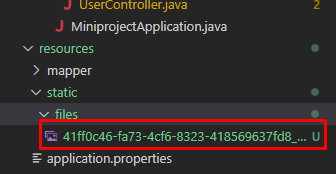
- 이미지를 저장할 경로를 projectdPath라는 이름의 변수를 선언해주고, System.getProperty("user.dir") 은 현재 작업 디렉토리를 얻는 코드이고 뒤에 오는 경로는 작업디렉토리 내에 이미지를 저장할 경로를 적어준다. ( 자바에서 \를 표현할려면 이스케이프 문자로 \\ 이렇게 입력해야 \ 로 인식된다.)
- UUID(Universally Unique Identifiers)는 각 개체를 고유하게 식별가능한 값이다.
- 그래서 uuid클래스의 randomUUID()메서드로 랜덤으로 식별자를 받아서 uuid변수에 넣어준다.
- 이미지명을 저장하기 위해 아까 만들었던 고유한 식별자(uuid)와 _(언더스코어) 파일의실제이름을 받아서 fileName에 저장.
- 그리고 File객체를 생성하여 projectPath(사진저장할경로), fileName(이미지명)을 생성자로받아 생성.
- 그리고 transferTo()메서드를 잉요하여 아까 만들었떤 File객체를 저장한다.
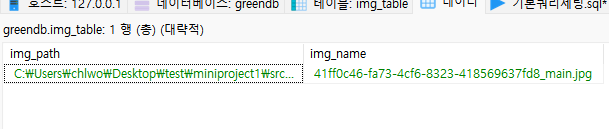
- 그리고 쿼리문을 실행하기 위해 dao를 사용.
import java.io.File;
import java.util.UUID;

import org.springframework.stereotype.Service;
import org.springframework.web.multipart.MultipartFile;

import lombok.RequiredArgsConstructor;
import site.metacoding.miniproject.domain.img_table.ImgTableDao;

@RequiredArgsConstructor
@Service
public class PersonService {
    private final ImgTableDao imgTableDao;

    public void write(MultipartFile file) throws Exception {
        String projectPath = System.getProperty("user.dir") + "\\src\\main\\resources\\static\\files"; // 이미지 저장할경로

        UUID uuid = UUID.randomUUID(); // 랜덤으로 식별자 생성
        String fileName = uuid + "_" + file.getOriginalFilename();
        File saveFile = new File(projectPath, fileName);

        file.transferTo(saveFile);
        imgTableDao.insert(projectPath, fileName);
    }
}
- 실제 service는 controller에서 호출한다.
- controller명도 다른이름을 사용해도 무관함.
- test()함수는 아까 html을 불러올 파일이고. return명에 파일명만 있는 이유는 뷰리졸버를 설정했기 떄문.
- view부분에서 post방식으로 /upload 주소로 action했기때문에 똑같이 @PostMapping("/upload")적어주고 MutipartFile 타입의 file을 받고 예외처리를 걸어준다.
- 그리고 service를 호출하여 service에서 만든 write메서드 사용. 그리고 return은 첫 페이지로 redirect한다.
import org.springframework.stereotype.Controller;
import org.springframework.web.bind.annotation.GetMapping;
import org.springframework.web.bind.annotation.PostMapping;
import org.springframework.web.multipart.MultipartFile;

import lombok.RequiredArgsConstructor;
import site.metacoding.miniproject.service.PersonService;

@RequiredArgsConstructor
@Controller
public class PersonController {

    private final PersonService personService;

    @GetMapping("/test")
    public String test() {
        return "test";
    }

    @PostMapping("/upload")
    public String upload(MultipartFile file) throws Exception {
        personService.write(file);
        return "redirect:/test";
    }
}
'Spring&Springboot > Spring(개인공부용)' 카테고리의 다른 글
| [Spring] 서블릿(Servlet)이란 ? (0) | 2022.12.06 |
|---|---|
| [Spring] 웹서버(WebServer), WAS란 ? (0) | 2022.12.06 |
| [MyBatis]Springboot에서 DB 언더스코어 -> Java 커멜표기법 변환 (0) | 2022.09.27 |
| [Spring] Validation 라이브러리 사용하기 (1) | 2022.09.21 |
| [Spring] Custom Exception 만들기 (0) | 2022.09.21 |

